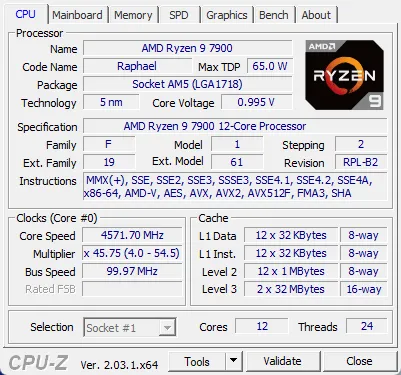
CPU Tab
The CPU tab provides comprehensive information about your processor, essential for understanding your system's capabilities and verifying hardware specifications.
Information Displayed:
- Processor Name: Full commercial name of your CPU
- Code Name: Internal codename used by manufacturer
- Socket: Physical socket type (LGA, PGA, BGA)
- Core Voltage: Current CPU voltage (Vcore)
- Specification: Full processor specification string
- Core Speed: Real-time CPU clock frequency
- Multiplier: CPU multiplier ratio
- Cores & Threads: Physical cores and logical threads
- Instructions: Supported instruction sets (SSE, AVX, etc.)

Use Cases:
Verify CPU model after purchase, check if overclocking is working, identify processor generation, confirm instruction set support for software requirements, and troubleshoot CPU-related issues. For detailed instructions on how to read CPU-Z results, see our complete guides.
Caches Tab
The Caches tab displays detailed information about your CPU's cache hierarchy, which is crucial for understanding performance characteristics.
Cache Levels:
- L1 Data Cache: Fastest cache, typically 32KB per core
- L1 Instruction Cache: Stores instructions, typically 32KB per core
- L2 Cache: Larger than L1, shared or per-core, typically 256KB-1MB
- L3 Cache: Largest cache, shared across cores, typically 8MB-64MB+

Use Cases:
Understand CPU architecture, compare cache sizes between processors, identify performance bottlenecks, and verify cache specifications for gaming or professional workloads.
Mainboard Tab
The Mainboard tab provides complete information about your motherboard, essential for driver updates, compatibility checks, and system documentation.
Information Displayed:
- Manufacturer: Motherboard brand (ASUS, MSI, Gigabyte, etc.)
- Model: Exact motherboard model number
- Chipset: Northbridge and Southbridge chipset information
- BIOS: BIOS brand, version, and date
- Graphics Interface: PCI-Express version and link width
- Southbridge: Additional chipset details

Use Cases:
Identify motherboard for driver downloads, check BIOS version for updates, verify PCIe slot capabilities, confirm chipset compatibility, and document system specifications.
Memory Tab
The Memory tab shows real-time memory information including type, size, frequency, and channel configuration.
Information Displayed:
- Type: RAM type (DDR3, DDR4, DDR5)
- Size: Total installed memory capacity
- Channel #: Single, dual, or quad channel mode
- DRAM Frequency: Real-time memory clock speed
- FSB:DRAM: Front-side bus to memory ratio
- CAS Latency: Memory timing information

Use Cases:
Verify RAM capacity and type, check if dual-channel is active, confirm memory frequency matches specifications, troubleshoot memory-related issues, and optimize memory configuration.
SPD Tab
The SPD (Serial Presence Detect) tab provides detailed information about each individual memory module installed in your system.
Information Displayed:
- Module Size: Capacity of each memory stick
- Max Bandwidth: Maximum supported frequency
- Manufacturer: RAM module manufacturer
- Part Number: Exact model number of the module
- Serial Number: Unique module identifier
- Timings Table: Supported JEDEC timings
Use Cases:
Identify exact RAM model for upgrades, verify memory module specifications, check compatibility between modules, troubleshoot memory issues, and find replacement modules.
Graphics Tab
The Graphics tab displays information about your graphics processing unit (GPU), whether integrated or dedicated.
Information Displayed:
- Name: GPU model name
- Code Name: Internal GPU codename
- Technology: Manufacturing process (nm)
- Memory Size: VRAM capacity
- Memory Type: VRAM type (GDDR5, GDDR6, etc.)
- Bus Width: Memory bus width
Use Cases:
Verify GPU model, check VRAM capacity, identify integrated vs dedicated graphics, confirm GPU specifications for gaming requirements, and troubleshoot graphics-related issues.
Bench Tab
The Bench tab allows you to run CPU benchmarks and compare your processor's performance with reference CPUs.
Features:
- Single Thread Benchmark: Tests single-core performance
- Multi Thread Benchmark: Tests multi-core performance
- Reference Comparison: Compare with other CPUs
- Real-time Scores: Live benchmark results
- Validation: Verify overclocking stability

Use Cases:
Test CPU performance, compare with other processors, verify overclocking results, identify performance bottlenecks, and validate system stability after hardware changes.